AI assistants
FinBoom, inside Claude and ChatGPT.
Ask about your spending, net worth and budgets, or add an expense in one line. You choose what it can see and change.
swiggy 450 last night on hdfc card, and 799 for ACT fibre today
add_transactionsAdded both to FinBoom.
Swiggy
Food & Dining · Yesterday
ACT Fibre
Bills & Utilities · Today
Type it the way you'd say it.
Ask
- Compare my Food & Dining spend in October with September
- When is my next home loan EMI, and how much is left?
- What did I spend the most on this year?
Add
- Add ₹450 Swiggy dinner yesterday from my HDFC card
- Moved ₹20,000 from savings to my credit card today
- Log ₹2,400 petrol and ₹180 parking from this morning
Set it up in 2 minutes
Copy this link. No key or password to paste. It's also in Settings, Integrations.
Connector link
https://www.finboom.app/api/mcp- 1
Open Connectors
Customize in the sidebar, then Connectors, Add, Add custom connector.
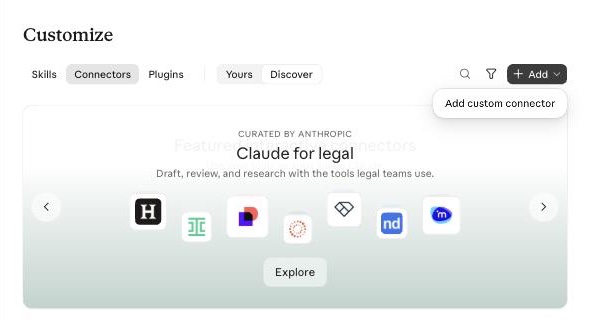
- 2
Paste the link
Name it FinBoom, paste the link above, then Continue and Add.
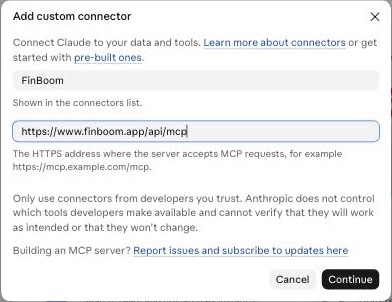
- 3
Allow access
Click Connect, sign in to FinBoom, pick a profile and what it may do.
- 4
Start asking
Open a new chat. It works in the Claude phone app too.
You choose what it can do.
Picked when you connect. It only sees the one profile you choose, and you can disconnect it from Settings, Integrations at any time.
- Read only
- Answers questions. Can't change anything.
- Add entries only
- Logs expenses, income and transfers. Can't read.
- Full access
- Reads everything, and adds, edits and deletes entries.
Questions
Still stuck? Write to support@finboom.app. Building something yourself? See the developer docs.
What do I need?
FinBoom Pro, plus Claude on any plan (the free plan allows one custom connector) or ChatGPT on a paid plan such as Plus.
Who sees my data?
What the assistant reads is sent to its maker (Anthropic or OpenAI) and their privacy terms apply. FinBoom never sees your chats. Connect only an assistant you trust with your finances.
How do I disconnect?
Settings, Integrations, AI assistants lists every connected app with its access and last use. Tap Disconnect and it loses access straight away. Apps also pause if your Pro plan ends.
It won't connect
Check the link starts with https://www.. The address without www doesn't work for connecting.
It says it can't add entries
You picked Read only. Disconnect it in FinBoom, connect again and pick Full access.
The numbers look wrong
It may be using another profile. Ask it "Which FinBoom profile are you using?".